Zapier automation that fails loudly rather than silently
What Zapier is genuinely good at
It already connects to the thing you use. Zapier's app catalogue is the largest of the three platforms on this site by a wide margin, and that matters most for exactly the software a small firm runs on: the scheduling tool, the proposal tool, the industry-specific system with four thousand customers. On the other platforms that integration is often built by hand against an API. Here it usually exists, and an integration that exists is cheaper and more reliable than one that is written.
Your own team can read it. This is the strongest argument for Zapier and it is an argument about handover rather than engineering. A Zap is a short, linear list of steps in plain language. The office manager who inherits it can open it, see what it does, and change a field without calling anybody. On a visual canvas with branching routes, or in a workflow with a JavaScript node in the middle, they cannot.
The shape of problem it suits is a clear, mostly linear process between well-known applications. The business value is that it happens every time without anybody remembering to do it. The second condition is that the people who run the business should be able to see how it works. A signed proposal creates the project, the client folder and the kickoff task, then tells the team. That is Zapier at its best.
Its free steps change the arithmetic. Zapier does not charge for triggers, for polling, or for its own built-in steps such as filters, formatting and paths. Only successful action steps count against the allowance. A Zap that checks a condition and does nothing most of the time is therefore close to free to run, which is a genuinely favourable model for processes that fire often and act rarely.
Where Zapier stops
Polling is latency, and it is sold as a plan feature. Where an app has no webhook, Zapier asks it for changes on an interval, published as 15 minutes on the free tier and as short as a minute higher up. For a nightly sync that is irrelevant. For anything a client is waiting on, a quarter of an hour is a long time, and the fix is a different design rather than a bigger plan.
It bills per successful action, so a long Zap is an expensive Zap. Eight actions in a run is eight tasks. The free built-in steps soften this considerably, but a process that writes to five systems every time still costs five times what one that writes to one does, and a chain of Zaps calling Zaps multiplies rather than shares.
The task ceiling is a cliff, not a slope. With overage billing switched off, usage stops at the allowance until the cycle resets. With it switched on, overage is charged at a multiple of the base rate, higher on monthly billing than on annual, and usage still stops at three times the subscription. Either way there is a month-end at which a working automation stops working for a reason that has nothing to do with the automation. Keplify sets the alert on consumption rather than letting the cliff introduce itself.
Real branching becomes several Zaps. Paths and looping exist, but Zapier is linear by temperament. A process that genuinely forks three ways, each fork touching several systems, tends to be expressed as several Zaps, and several Zaps is a process no single screen shows you. That is the point at which Keplify stops recommending Zapier, and it is further down the page.
A switched-off Zap looks exactly like a working one. In a list of thirty, an automation that has been off since March is a row like any other. This is not a criticism of the product so much as the central operational risk of using it, and it is what the next section exists to handle.
Roughly what it costs to run
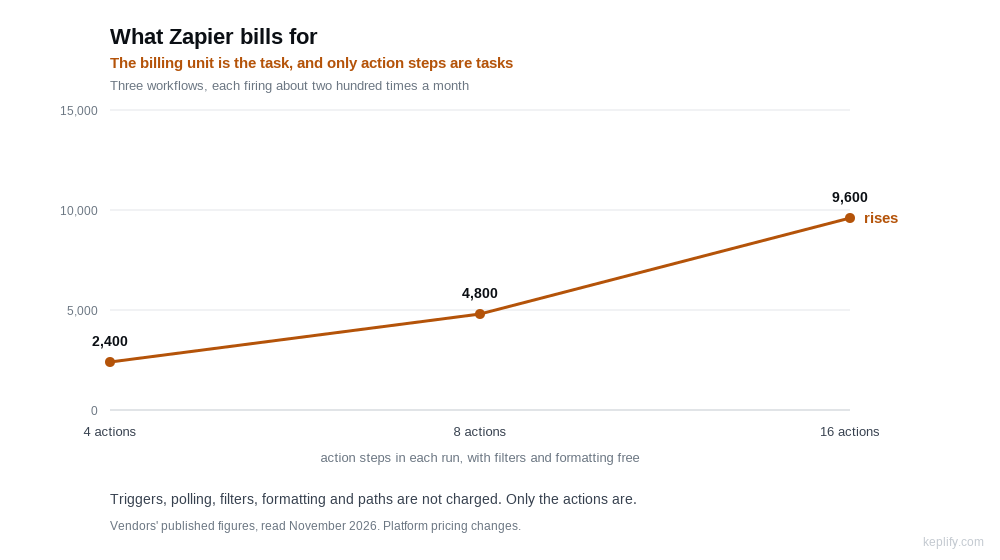
Take the same realistic small-firm load used on the Make and n8n pages: three processes, each firing about two hundred times a month, each averaging twelve steps per run. On Zapier the figure that matters is not twelve, it is how many of those twelve are action steps, because the filters and the formatting are free. Call it eight. That is roughly 4,800 tasks a month.
4,800 tasks is well past the free tier's 100 and past the entry paid tier. Zapier's published figures ran from about $20 a month for 750 tasks to about $129 a month for 10,000 tasks, both on annual billing, so a load like this lands between those two anchors, in the tens of dollars a month rather than the hundreds. Monthly billing costs appreciably more than annual, and so does overage.
It is worth being plain about the comparison, because it is the reason this site has three pages rather than one. The same three processes cost materially less to execute on a platform that bills per workflow run than on either of the ones that bill per action. If the volume is small, that difference is noise and the better handover wins. If the volume grows, it stops being noise, and the n8n page is the argument for moving.
Platform pricing changes. These were the vendor's published figures in November 2026 and are worth checking before anybody plans a budget around them.
What happens when it breaks
An automation that silently stops is worse than a manual process, because nobody notices for a month. On Zapier that risk is higher than on the other two platforms, because a stopped Zap is invisible in a list.
What is tested before handover
Every step with real data, and then the four cases that break Zaps in practice: the duplicate event, the empty field, the record that already exists, and the one where a required field arrives in the wrong format. The last of those is the most common silent failure on this platform, because a malformed value is often accepted by the destination app rather than rejected.
What runs in parallel, and for how long
The manual process stays in place for the first two weeks while the Zaps run beside it, and the two outputs are compared. For anything touching money or a client-facing message, the first week runs with the final action pointed at an internal destination so the output can be read before it is sent.
How a failure becomes visible
Three things, because Zapier's own history is a page nobody opens. Error notifications are switched on and pointed at somebody who will act, not at a shared mailbox. A Zap that matters gets a heartbeat: a scheduled check that something expected actually happened, which is what catches a Zap that was turned off rather than one that errored. And task consumption is alerted on before the allowance runs out.
Who is called when a vendor changes an API
On this platform, usually Zapier first, because the integration is theirs to update. The gap between an app changing and Zapier shipping the fix is the exposure, and it is a real argument for not putting a business-critical, time-sensitive process on a prebuilt integration you do not control. Beyond that, Keplify, quoted when it happens: an automation on its own is not sold a care plan, and a change to one Zap is usually well under an hour. Either way the handover documents what each Zap does and what to check first.
A real automation is usually not one platform
Most of what Keplify delivers spans three things: a platform holding the orchestration, a script where the logic is genuinely algorithmic, and a feature inside a tool the client already pays for. A single-vendor pitch is a sales position rather than an engineering one, and on Zapier the script half of that is usually a small code step or a Google Apps Script, because the platform's own transformation tools run out sooner than its app catalogue does.
Keplify has built an automation layer connecting marketing, delivery and internal communications for a professional services firm, including a working integration with a tool that had no public API at all. Hours of weekly manual reporting went to zero. Keplify does not name clients, and that includes yours.
What it costs to build
| Part | What it means | Price |
|---|---|---|
| An automation with no screens, first workflowSystems talking to each other, with no screens of their own | Systems talking to each other, with no screens of their own | $2,000 |
| Each workflow after the firstA second or third thing the same automation does | A second or third thing the same automation does | $1,000 |
| Connect a system with no APIThe one everybody told you was impossible | The one everybody told you was impossible | $2,750 |
One process: $2,000
One process automated end to end, tested against the manual version, monitored, documented, and running in your own Zapier account. It is about a week.
Each one after that: $1,000
The second and third cost less because the connections, the credentials and the monitoring already exist. Taking over and fixing an existing account starts with a Blueprint instead, because the work is in the reading.
The full parts list is on the prices page, including what it costs to connect a system with no public API.
When Keplify would choose a different platform
Zapier is the platform Keplify recommends when the handover matters more than the engineering. Three cases where it recommends something else:
When the process genuinely branches, go to Make. If a run forks three ways and each fork touches several systems, that is one scenario on a visual canvas and three or four Zaps here. Three or four Zaps is a process nobody can see at once, and invisible processes are the ones that break.
When the volume is real, go to n8n. Per-action billing is fine at hundreds of runs a month and punishing at tens of thousands. A platform that charges per workflow run regardless of step count is the answer at that scale, and the saving pays for the migration quickly.
When the data cannot leave your infrastructure, go to self-hosted n8n.Zapier is hosted, so the records pass through it. For a firm whose client documents must stay inside its own cloud account, no plan tier changes that, and Keplify will not pretend otherwise to keep the work on an easier platform.
Questions
- Why pay somebody to build a Zap when Zapier is meant to be easy?
- Because the building is not the hard part. Connecting two apps takes ten minutes and most businesses manage it unaided. What takes experience is the half of the work nobody demonstrates: deciding what happens to the record that is already there, what happens when a field is empty, what happens when the same event arrives twice, and how anybody finds out when it stops. The Zaps Keplify is called in to fix are almost never wrong in the happy path.
- Existing Zaps keep breaking. Can that be fixed?
- Usually, and it starts with a $1,000 Blueprint reading what is there, because nobody can quote for an account they have not opened. The most common findings are the same three: duplicate handling that was never built, a silent failure nobody is alerted to, and a chain of single-step Zaps that has grown into a process no one person can see. Sometimes the finding is that it should be rebuilt rather than patched, and that is priced as normal work.
- How quickly does a Zap actually run?
- That depends on the trigger and the plan, and it is the thing most often assumed rather than checked. Webhook triggers fire immediately. Triggers that poll an app for changes run on an interval set by the plan, published as 15 minutes on the free tier and as short as a minute on the higher ones. If a process needs to react in seconds, Keplify will say so and build it a different way rather than sell a plan upgrade that does not fix it.
- Will the Zaps be in Keplify's account?
- No, never. They are built in your own Zapier account, under your billing, with Keplify's access granted by you and revocable at any time. Automation living in a contractor's account is the most common reason a working automation becomes unmaintainable, and losing access to it is not a risk any business should accept to save a setup step.
Bring the Zaps that keep breaking
Twenty minutes, no deck. Bring the invoice for the software you want to replace, or a description of what gets done by hand, and Keplify will do the arithmetic with you on the call.